

Mobile apps have become an essential part of modern digital life. From shopping and banking to entertainment and productivity, users rely on mobile applications every day. However, building a successful mobile app requires more than just writing code. A great app must also deliver a smooth, enjoyable, and intuitive experience for users.
This is where UI vs UX becomes an important concept for app developers. Many people confuse these two terms or assume they mean the same thing. In reality, UI (User Interface) and UX (User Experience) are closely related but fundamentally different aspects of app development.
Understanding the difference between UI vs UX for app developers is essential when creating applications that users enjoy and continue to use over time.
In this comprehensive guide by Infotech Wayout, we will explore:
- What UI design means
- What UX design means
- The key differences between UI and UX
- Why both are important in mobile app development
- Best practices for app developers
- Common mistakes to avoid
By the end of this guide, you will clearly understand how UI vs UX impacts app development and how both work together to create outstanding mobile applications.
Understanding UI vs UX in App Development
Before diving deeper, it is important to understand the basic concept of UI vs UX.
Many businesses that want to build an app focus only on features and development. However, modern users expect applications that are not only functional but also easy and enjoyable to use.
For app developers, understanding UI vs UX ensures that the app is both visually appealing and user friendly.
In simple terms:
- UI focuses on visual design and layout
- UX focuses on user satisfaction and usability
Both are essential for building a successful application.
What is UI (User Interface)?
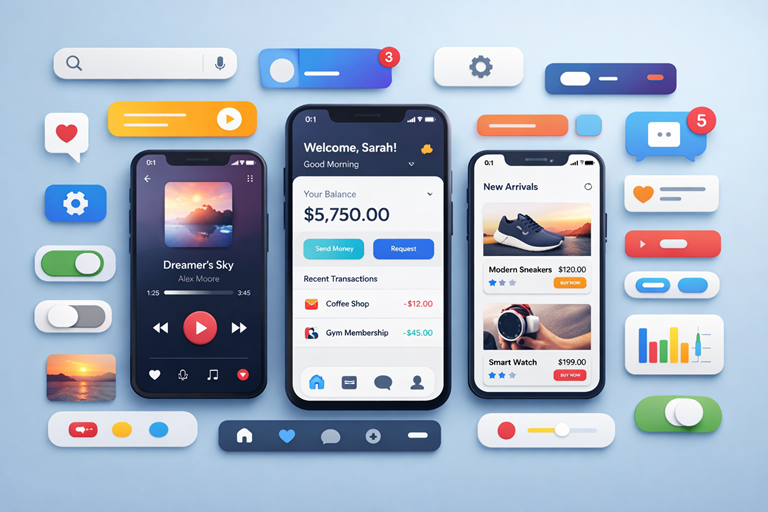
The User Interface (UI) refers to the visual elements of an application that users interact with.
UI includes everything a user sees on the screen, such as buttons, icons, menus, colors, typography, and layouts.
UI design focuses on how the app looks and how its components are presented to the user.
Key Elements of UI Design
Some of the most important elements in UI design include:
Visual Layout
The arrangement of components on the screen.
Typography
The fonts and text styles used in the app.
Color Scheme
Colors that create brand identity and visual hierarchy.
Buttons and Icons
Interactive elements that guide user actions.
Navigation Design
Menus and navigation systems that allow users to move through the app.
Why UI Matters in Mobile App Development
A well designed interface improves user engagement and creates a positive first impression.
Benefits of good UI include:
- Attractive app appearance
- Strong brand identity
- Easy interaction with app features
- Higher user engagement
- Better retention rates
For example, if a mobile app has confusing buttons or cluttered layouts, users may abandon the app quickly.
This is why UI plays a significant role in UI vs UX for app developers.
What is UX (User Experience)?
While UI focuses on appearance, UX (User Experience) focuses on how the user interacts with the app and how they feel while using it.
UX design aims to create smooth, intuitive, and meaningful experiences for users.
UX includes:
- User research
- Information architecture
- User journey mapping
- Wireframing
- Usability testing
In simple terms, UX answers the question:
Is the app easy and enjoyable to use?

Key Components of UX Design
User Research
Understanding the needs and behaviors of users.
Information Architecture
Structuring content so users can find information easily.
Wireframing
Creating basic layouts before designing the interface.
Prototyping
Building interactive mockups to test functionality.
Usability Testing
Testing the app with real users to identify problems.
Why UX Matters for App Developers
UX design ensures that users can accomplish their goals efficiently.
A strong UX provides:
- Easy navigation
- Logical workflow
- Fast task completion
- Reduced frustration
- Higher customer satisfaction
When users enjoy the experience of using an app, they are more likely to continue using it.
This makes UX a critical part of UI vs UX in app development.
UI vs UX: Key Differences Explained
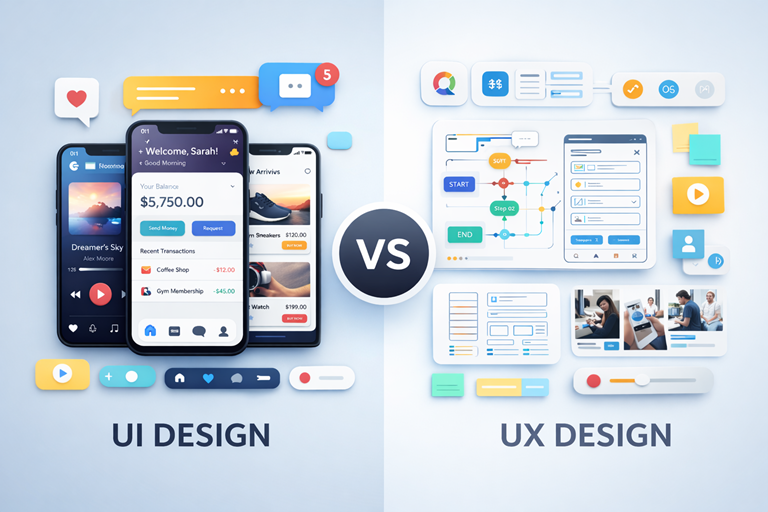
Although UI and UX work together, they have different goals and responsibilities.
| Aspect | UI (User Interface) | UX (User Experience) |
|---|---|---|
| Focus | Visual design | User satisfaction |
| Purpose | How the app looks | How the app works |
| Elements | Colors, fonts, buttons | User flow, navigation, usability |
| Goal | Attractive interface | Smooth experience |
| Process | Design implementation | User research and testing |
In short:
UI is about appearance.
UX is about experience.
Both are essential in creating successful mobile applications.
The Relationship Between UI and UX
Although they are different disciplines, UI and UX work closely together.
A beautiful interface without good usability will frustrate users.
Similarly, a well structured app without attractive design may fail to engage users.
Successful mobile apps combine both UI and UX effectively.
UI vs UX for App Developers
For app developers, understanding UI vs UX is essential during the development process.
Developers often collaborate with designers to ensure that the application works exactly as intended.
Developers implement the UI design
They convert design files into working app interfaces.
Developers support UX functionality
They ensure smooth navigation, fast loading, and logical workflows.
When developers understand UI and UX principles, they can build apps that are both functional and user friendly.
How UI and UX Work Together in Mobile App Development
A successful mobile app follows a structured design process.
Step 1: User Research
Identify the target audience and their needs.
Step 2: UX Planning
Create user journeys and wireframes.
Step 3: UI Design
Develop the visual interface.
Step 4: App Development
Developers implement features and designs.
Step 5: Usability Testing
Test the app with real users and refine the experience.
This process ensures that both UI and UX are optimized before launching the application.
Benefits of Good UI and UX for Mobile Apps
Understanding UI vs UX for app developers offers several benefits.
Improved User Satisfaction
Users enjoy apps that are easy and attractive.
Higher Retention Rates
Better experience leads to repeat usage.
Increased Conversion Rates
Users complete actions like purchases or registrations.
Strong Brand Identity
Consistent UI design strengthens brand recognition.
Competitive Advantage
Apps with great UX outperform competitors.
Common UI Mistakes in Mobile Apps
Many apps fail because of poor interface design.
Common UI mistakes include:
- Overcrowded screens
- Poor color combinations
- Inconsistent design elements
- Hard to find buttons
- Small or unreadable text
Avoiding these mistakes improves the visual quality of the application.
Common UX Mistakes in Mobile Apps
UX mistakes can make even visually attractive apps difficult to use.
Examples include:
- Complex navigation
- Too many steps to complete tasks
- Slow loading times
- Confusing workflows
- Lack of user feedback
Good UX design focuses on simplifying the user’s journey.
Best UI Design Practices for App Developers
Developers and designers should follow certain best practices to improve UI quality.
Keep the Interface Simple
Minimal design improves usability.
Maintain Consistency
Use consistent colors, fonts, and icons.
Focus on Visual Hierarchy
Highlight important elements.
Optimize for Mobile Screens
Design for different screen sizes.
Use Clear Icons and Buttons
Ensure users understand interactions.
Best UX Design Practices for Mobile Apps
UX design should focus on solving user problems efficiently.
Understand User Behavior
Conduct research before designing.
Simplify User Journeys
Reduce unnecessary steps.
Prioritize Performance
Ensure fast loading times.
Provide Feedback
Use animations and messages to guide users.
Test with Real Users
Usability testing improves the experience.

Why Businesses Should Care About UI vs UX
Businesses investing in mobile apps should understand the importance of UI vs UX.
A well designed application improves customer engagement and business performance.
Benefits include:
- Increased customer loyalty
- Higher app ratings
- More downloads
- Improved brand reputation
At Infotech Wayout, we help businesses design and develop mobile apps that combine strong UI and seamless UX to create successful digital products.
The Future of UI and UX in Mobile Apps
As technology evolves, UI and UX continue to change.
Emerging trends include:
AI Driven Personalization
Apps adapting to user behavior.
Voice Interfaces
Voice based navigation.
Gesture Based Navigation
Touch and motion interactions.
Micro Interactions
Small animations that improve engagement.
Dark Mode Interfaces
User friendly design options.
These trends will continue shaping UI vs UX in mobile app development.
How Infotech Wayout Designs UI and UX for Mobile Apps
At Infotech Wayout, we follow a structured approach to designing user friendly applications.
Our process includes:
- User research and strategy
- Wireframe development
- UI design creation
- Mobile app development
- Testing and optimization
Our goal is to deliver mobile apps that are visually appealing, easy to use, and optimized for performance.
Conclusion
Understanding UI vs UX is essential for anyone involved in mobile app development.
UI focuses on the visual design of an application, while UX focuses on the overall user experience.
Both disciplines work together to create applications that are attractive, functional, and easy to use.
For app developers, mastering the relationship between UI vs UX can significantly improve the quality of the apps they build.
Businesses that invest in strong UI and UX design are more likely to create successful mobile applications that users love.
At Infotech Wayout, we specialize in building modern mobile apps with exceptional design and usability to help businesses grow in the digital world.
Frequently Asked Questions (FAQ)
1. What is the main difference between UI and UX?
UI focuses on the visual design of an application, including buttons, colors, and layout. UX focuses on the overall user experience and how easily users can interact with the app.
2. Which is more important, UI or UX?
Both UI and UX are equally important. UI attracts users visually, while UX ensures the app is easy and enjoyable to use.
3. Can an app have good UI but poor UX?
Yes. An app may look visually appealing but still be difficult to navigate or use. This results in poor user experience.
4. Why is UX important for mobile apps?
UX ensures users can complete tasks easily and efficiently. A good user experience improves retention, engagement, and customer satisfaction.
5. Do app developers need to understand UI and UX?
Yes. Even though designers often handle UI and UX, developers benefit from understanding these concepts to implement designs effectively.
6. What tools are used for UI and UX design?
Common tools include:
- Figma
- Adobe XD
- Sketch
- InVision
These tools help designers create wireframes, prototypes, and visual interfaces.
7. How does UI and UX affect app success?
Apps with strong UI and UX provide better user satisfaction, which leads to higher downloads, better reviews, and improved retention.
8. How can businesses improve UI and UX in their apps?
Businesses can improve UI and UX by conducting user research, simplifying navigation, testing usability, and working with experienced app developers like Infotech Wayout.

